
Synchronizing Linked Views
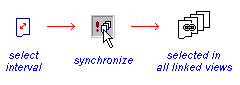
Holes or intervals selected in one view can be displayed in any
other view using synchronized linked views. The action of other views when a selection is
synchronized is determined by the status of the  Linked and
  Live settings
You synchronize views by select a hole interval then right-clicking to display the context menu. Select Synchronize.
Related topics and activities:
